Convert OmegaT project to XLIFF for other CAT tools

I’m back with another little script that might be pretty handy for those who need to work on the same material in different CAT tools, or for translation agencies who use OmegaT as their main CAT application but farm out the work to translators using their CAT tools of choice. As a matter of fact, the script was requested by translation agency Velior for this very reason.
When the script is invoked, it writes out a file named PROJECTNAME.xlf (PROJECTNAME is the actual name of the project, not this loudly yelled word, of course), and the file is located in script_output subfolder of the current project. It exports both translated (they get “final” state in the resultant XLF file) and untranslated segments, and for untranslated segments the source is copied to the target, and such segments get “needs-translation” state. OmegaT segmentation and tags are preserved. Tags get enveloped in <ph id=”x”> and </ph>, so that they are treated as tags in other CAT tools.
Here is the link where you can download the ready-to-use (albeit still BETA) version:

To get the translation back to OmegaT once the file has been processed in another CAT tool, it’s advised to use Okapi Framework (Rainbow for GUI/Tikal for command line). To get 100% transferability the pipeline in Okapi should include TMX export and Inline codes removal (remove marker, keep content). The script can write out a .rnb file (enabled by default) that can be opened in Rainbow.
Here’s how conversion to TMX is done in Rainbow:

  1. Start Rainbow.
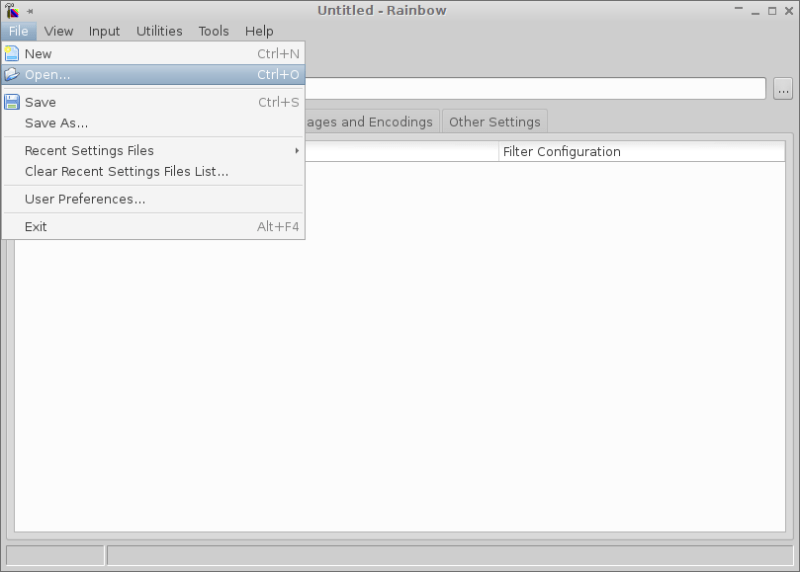
  2. Open the settings .rnb file created by the script (located in script_output subfolder of the project).
    Open settings file
  3. Drag the PROJECTNAME.xlf into the first tab of Rainbow window.
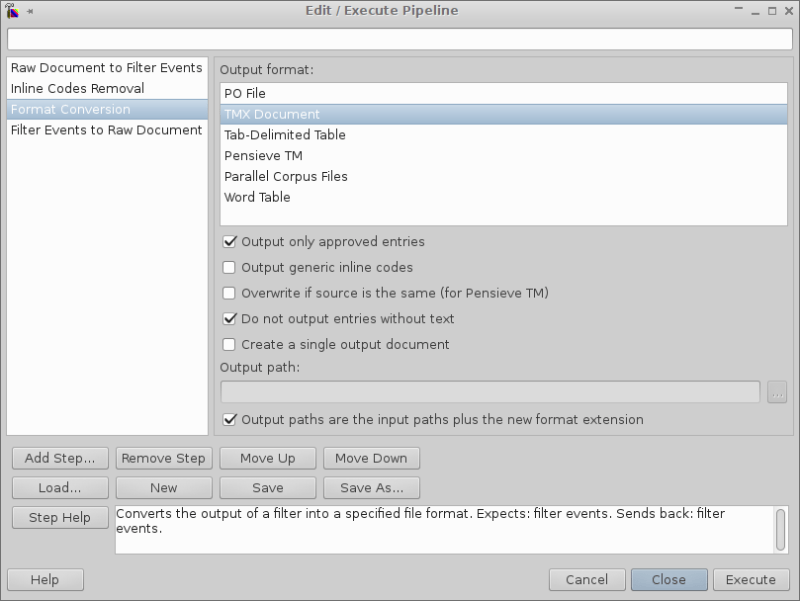
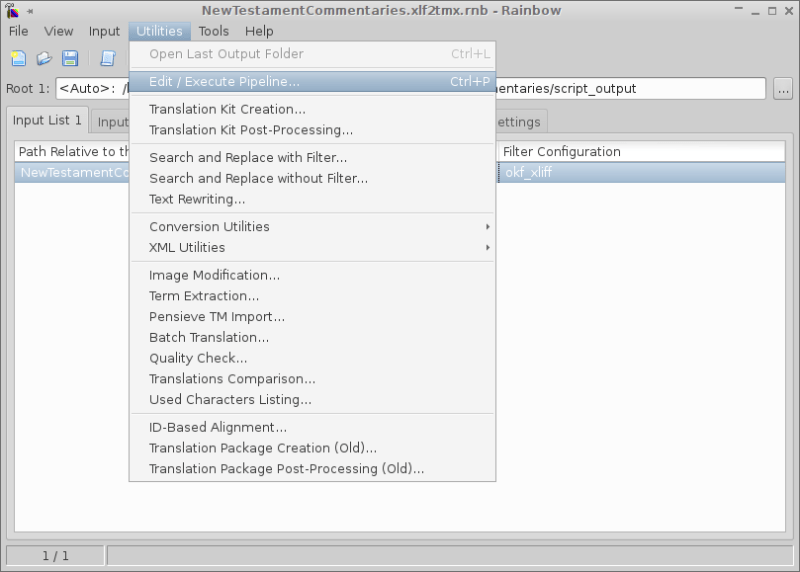
  4. Go to Utilities → Edit/Execute Pipeline and press Execute button in the window. Several settings might need to be tweaked for TMX conversion step (see screenshot).
    Edit / Execute Pipeline
    Pipeline TMX step
  5. The TMX file will be created in the same folder where the XLF file was.

It has been tested with Virtaal, Transolution Xliff Editor, SDL Trados Studio 2011, Kilgray MemoQ 2013, and ATRIL Déjà Vu X2. These programs can create TMX files containing the translation that is supposedly the same as in the XLF file. But when those TMX’s are used back in OmegaT, there are always issues with tags. To get “perfect” matches, the XLF itself has to be converted as described above.

The script is in BETA stage. It means that whatever happens to your data, hardware or mental state, I didn’t do it! More tests are always appreciated. Bug reports and feature requests can be left here as comments or filed at SourceForge bug tracker (make sure you’re filing them in my project, not in the project for OmegaT, as I don’t want to be hated by OmegaT developers).


UPDATE

Converting XLF to TMX to be used back in OmegaT now can be automated. See this post for details.

But as of now,
GOOD LUCK

16 thoughts on “Convert OmegaT project to XLIFF for other CAT tools

  1. Pingback: (CAT) - Convert OmegaT project to XLIFF for oth...
  2. Pingback: (CAT) – Convert OmegaT project to XLIFF for other CAT tools | Translator’s Recipes | Glossarissimo!
  3. Pingback: Convert OmegaT project to XLIFF for other CAT t...
  4. Pingback: (CAT) - Convert OmegaT project to XLIFF for oth...
  5. Pingback: (CAT) - Convert OmegaT project to XLIFF for oth...
  6. Hi there, Kos. Thank you for this wondeful script, it come in very useful to outsource part of a project in OmegaT to linguistis who use OLT. However, I found a small glitch. The original XLIFF files have something like: <b>sometext</b> and in your merged XLIFF I get: <bzzzsmall>/bzzz. This is probably due to the specific nature of my XLIFF files, not your script, but not knowing for sure I wanted to share it with you, in case you have any tips. Thanks!

  7. Pingback: (CAT) – Convert OmegaT project to XLIFF for other CAT tools | Translator’s Recipes – Glossarissimo!
  8. Hi, I made small fixes as described in the Yahoo Group to make it run in the latest versions of OmegaT (tested on 3.).


    /*
    * @author: Kos Ivantsov
    * @date: 2014-01-16
    * @version: 0.6
    * Original source: https://libretraduko.wordpress.com/2014/01/16/convert-omegat-project-to-xliff-for-other-cat-tools/
    * Changed by: Nilo Menezes based on comments found at: https://groups.yahoo.com/neo/groups/OmegaT/conversations/messages/36979?guccounter=1&guce_referrer=aHR0cHM6Ly93d3cucHJvei5jb20vZm9ydW0vb21lZ2F0X3N1cHBvcnQvMjk1Njk3LXNjcmlwdGluZ19lcnJvcl93cml0ZV9ub3Rlc2dyb292eS5odG1sP3ByaW50PTE&guce_referrer_sig=AQAAACDZGXME9vTwjAuMHaM7j3K0FEPwQrvNY_LsWUBToTf6SFPwBzx9MSTH7iqrgsLmAtpPdtImfYEwM3fBuxiPBQcHakGJ87H1xbk_9UWYO0KrQeQXjQD0IsaR-0t6vXk6VPJJS2d6Ln_fgRptS2qozN9VM34PzhQZM51-jYSsdbrM
    */
    /* set to true to write a settings file for Okapi Rainbow that can be
    * used to convert the XLF file produced by this script, to TMX
    * otherwise set to false */
    def rainbow = true
    /* set to true to output only approved entries from XLF to TMX during
    * conversion in Rainbow */
    def get_only_approved = true
    import static javax.swing.JOptionPane.*
    import static org.omegat.util.Platform.*
    import org.omegat.util.StringUtil
    def prop = project.projectProperties
    if (!prop) {
    final def title = 'Export project to XLIFF file(s)'
    final def msg = 'Please try again after you open a project.'
    showMessageDialog null, msg, title, INFORMATION_MESSAGE
    return
    }
    def folder = prop.projectRoot+'script_output/'
    projname = new File(prop.getProjectRoot()).getName()
    xliff_file = new File(folder + projname +'.xlf')
    // create folder if it doesn't exist
    if (! (new File (folder)).exists()) {
    (new File(folder)).mkdir()
    }
    count = 0
    ignorecount = 0
    transcount = 0
    writecount = 0
    def sourceLocale = prop.getSourceLanguage().toString().toLowerCase()
    def targetLocale = prop.getTargetLanguage().toString().toLowerCase()
    xliff_file.write("""<?xml version="1.0" encoding="UTF-8"?>
    <xliff xmlns="urn:oasis:names:tc:xliff:document:1.2" version="1.2">
    """, 'UTF-8')
    files = project.projectFiles
    for (i in 0 ..< files.size())
    {
    fi = files[i]
    xliff_file.append(""" <file original="$fi.filePath" source-language="$sourceLocale" target-language="$targetLocale" datatype="x-application/x-tmx+xml">
    <body>
    <trans-unit id="0" approved="yes">
    <source xml:lang="$sourceLocale"><ph id="filename">==FILENAME: "$fi.filePath"==</ph>
    </source>
    <target xml:lang="$targetLocale" state="final"><ph id="filename">==FILENAME: "$fi.filePath"==</ph>
    </target>
    </trans-unit>
    """, 'UTF-8')
    for (j in 0 ..< fi.entries.size())
    {
    def state
    def approved = ''
    def unitnote = ''
    def ignore = ''
    ste = fi.entries[j]
    seg_num = ste.entryNum()
    source = ste.getSrcText()
    info = project.getTranslationInfo(ste)
    target = info ? info.translation : null
    if (target == null){
    state = 'state="needs-translation"'
    target = "$source"
    }else{
    approved = ' approved="yes"'
    state = 'state="final" state-qualifier="exact-match"'
    transcount++
    }
    if (target.size() == 0 ){
    target = "<EMPTY>"
    }
    if (info.hasNote()) {
    unitnote = "\n <note>${StringUtil.makeValidXML(info.note)}</note>"
    }
    if (source ==~ /(<\/?[a-z]+[0-9]* ?\/?>){1,5}/ ){
    ignoresource = source
    ignore = 'yes'
    }
    source = source.replaceAll(/(<)(\/?[a-z]+[0-9]* ?\/?)(>)/, /zzz$2zzz/).replaceAll(/</, /zzz#LESSTHEN#zzz/).replaceAll(/>/, /zzz#GREATERTHEN#zzz/).replaceAll(/(zzz)(\/?[a-z]+[0-9]* ?\/?)(zzz)/, /<$2>/)
    target = target.replaceAll(/(<)(\/?[a-z]+[0-9]* ?\/?)(>)/, /zzz$2zzz/).replaceAll(/</, /zzz#LESSTHEN#zzz/).replaceAll(/>/, /zzz#GREATERTHEN#zzz/).replaceAll(/(zzz)(\/?[a-z]+[0-9]* ?\/?)(zzz)/, /<$2>/)
    source = StringUtil.makeValidXML(source).replaceAll(/&lt;/, /<ph>&lt;/).replaceAll(/&gt;/, /&gt;<\/ph>/).replaceAll(/zzz#LESSTHEN#zzz/, /&lt;/).replaceAll(/zzz#GREATERTHEN#zzz/, /&gt;/)
    target = StringUtil.makeValidXML(target).replaceAll(/&lt;/, /<ph>&lt;/).replaceAll(/&gt;/, /&gt;<\/ph>/).replaceAll(/zzz#LESSTHEN#zzz/, /&lt;/).replaceAll(/zzz#GREATERTHEN#zzz/, /&gt;/)
    tagnumber = source.findAll(/<ph>/).size()
    if (tagnumber > 0) {
    tgnum = 0
    while (tgnum++ <= tagnumber) {
    source = source.replaceFirst(/<ph>/, "<ph id=\"$tgnum\">")
    target = target.replaceFirst(/<ph>/, "<ph id=\"$tgnum\">")
    //console.println "count: "+tagnumber+"\n"+source
    }
    }
    if (source =~ '<ph>')
    source = source.replaceAll('<ph>', '<ph id="orph"')
    if (target =~ '<ph>')
    target = target.replaceAll('<ph>', '<ph id="orph">')
    if (ignore != 'yes'){
    xliff_file.append("""\
    <trans-unit id="$seg_num"$approved>
    <source xml:lang="$sourceLocale">$source</source>
    <seg-source><mrk mid="0" mtype="seg">$source</mrk></seg-source>
    <target $state xml:lang="$targetLocale"><mrk mid="0" mtype="seg">$target</mrk></target>$unitnote
    </trans-unit>
    """, 'UTF-8')
    writecount++
    }else{
    ignorecount++
    }
    count++
    }
    xliff_file.append(" </body>\n </file>\n", 'UTF-8')
    }
    xliff_file.append("</xliff>", 'UTF-8')
    console.println """
    ${'*'*(xliff_file.toString().size()+12)}
    Output file: $xliff_file
    ${'*'*(xliff_file.toString().size()+12)}
    Segments processed: $count
    Segments written: $writecount
    Segments not written: $ignorecount
    Translated segments written: $transcount
    Untranslated segments written: ${writecount-transcount}
    """
    if (rainbow == true) {
    def approved
    if (get_only_approved == true){
    approved = 'true'
    }else{
    approved = 'false'
    }
    rainbowfile = new File(folder + projname +'.xlf2tmx.rnb')
    rainbowfile.write("""\
    <?xml version="1.0" encoding="UTF-8"?>
    <rainbowProject version="4">
    <fileSet id="1">
    <root useCustom="0"></root>
    </fileSet>
    <fileSet id="2">
    <root useCustom="0"></root>
    </fileSet>
    <fileSet id="3">
    <root useCustom="0"></root>
    </fileSet>
    <output>
    <root use="0"></root>
    <subFolder use="0"></subFolder>
    <extension use="1" style="0">.out</extension>
    <replace use="0" oldText="" newText=""></replace>
    <prefix use="0"></prefix>
    <suffix use="0"></suffix>
    </output>
    <options sourceLanguage="$sourceLocale" sourceEncoding="UTF-8" targetLanguage="$targetLocale" targetEncoding="UTF-8"></options>
    <parametersFolder useCustom="0"></parametersFolder>
    <utilities xml:spaces="preserve"><params id="currentProjectPipeline">&lt;?xml version="1.0" encoding="UTF-8"?>
    &lt;rainbowPipeline version="1">&lt;step class="net.sf.okapi.steps.common.RawDocumentToFilterEventsStep">&lt;/step>
    &lt;step class="net.sf.okapi.steps.codesremoval.CodesRemovalStep">#v1
    stripSource.b=true
    stripTarget.b=true
    mode.i=0
    includeNonTranslatable.b=true
    replaceWithSpace.b=false&lt;/step>
    &lt;step class="net.sf.okapi.steps.formatconversion.FormatConversionStep">#v1
    singleOutput.b=false
    autoExtensions.b=true
    targetStyle.i=0
    outputPath=
    outputFormat=tmx
    useGenericCodes.b=false
    skipEntriesWithoutText.b=true
    approvedEntriesOnly.b=$approved
    overwriteSameSource.b=false&lt;/step>
    &lt;step class="net.sf.okapi.steps.common.FilterEventsToRawDocumentStep">&lt;/step>
    &lt;/rainbowPipeline>
    </params></utilities>
    </rainbowProject>
    """, 'UTF-8')
    }
    return

  9. Hi Kos. Some more feedback: I tried your script today again to export a one-file OmegaT project as XLIFF. I got this error in the scripting console:

    The script “C:\Users\souto\AppData\Roaming\OmegaT\scripts\write_xliff.groovy” is running…
    An error occurred
    javax.script.ScriptException: javax.script.ScriptException: groovy.lang.MissingMethodException: No signature of method: static org.omegat.util.StaticUtils.makeValidXML() is applicable for argument types: (String) values: [<x1/>]

    Indeed, my first segment has `<x1/>`. I am using the OpenXML filter.

Leave a comment