Going to the segment you need is quite easy in OmegaT (in most cases, but when it’s not, there is the wonderful scripting functionality).
Continue reading
Going to the segment you need is quite easy in OmegaT (in most cases, but when it’s not, there is the wonderful scripting functionality).
Continue reading
The earlier version of this script was described in this article. Here I’m announcing the update to the script which makes it possible to include:
1 or + in the dedicated column: for the first occurrence, or further instances of the repeated segment, respectfully)a with a different background in the dedicated column)NT in the dedicated column) All of the above features are optional, though they are on by default. To disable or change them, editing the script is required, but all those lines are very easy to understand, they have comments, and are placed almost in the very beginning of the script:
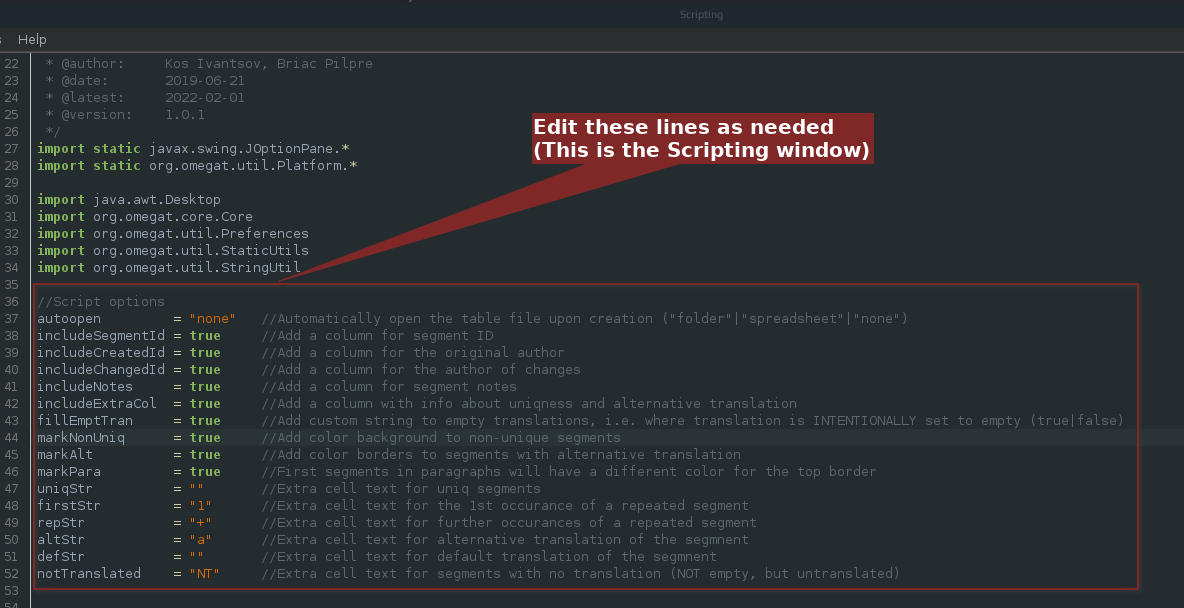
Unlike the earlier version, the script produces the tabular output:
| Segment # | Source Text | Target Text | Uniq/Al | Segment ID | Creator | Changer | Note |
|---|---|---|---|---|---|---|---|
The script can be downloaded from
SF.net repository
GitHub repository
To learn how to install and use OmegaT scripts, see this quick guide.
Comments, suggestions, complaints, and donations are always welcome!
Happy spreadsheeting!

A few years ago I wrote a script that exported the whole OmegaT to an HTML table. I used it a lot myself, and I know quite a few other people found it helpful too. The problem with the table produced by that script was that it had no way to show repeated or alternatively translated segments. I’ve rewritten the script since, but never published an announcement about that new version. Now I did a few more changes, and thought that it’s about time to fix that omission.
Continue reading
These days I often get jobs in IDML format. Luckily such files can be translated in OmegaT either with the Okapi filters plugin, or, if the files are not so plain and simple, by creating an OmegaT project in Okapi Rainbow. But it’s somewhat beyond the point. The point is that with these files the wonderful script to merge and split segments wasn’t working, at least for merging.
As you’ve rightly guessed, this tiny post is to inform you that it has been fixed, and the updated script could be downloaded from the SF.net repository.
December 2022 update: The updated merge and split script is described here.
To learn how to install and use OmegaT scripts, see this quick guide.
Happy merging and splitting, fellow OmegaTers!

As many have probably noticed, in OmegaT it’s now possible to unlock cursor. This means that one can select and copy text anywhere in the Editor pane without using the mouse. With the unlocked cursor you simply press up or down, and the text caret will move beyond the target segment. The lock is triggered with F2. Cool! But there’s no way to make this behavior default — every time OmegaT is started, cursor is locked.
Since I prefer it to be unlocked most of the time, here’s a little workaround. Below is a little script that needs to go into scripts_folder/application_startup/:
def gui() {
    editor.editor.lockCursorToInputArea = false
    editor.editor.updateLockInsertMessage()
}
return
This little snippet should be saved as a plaintext file with extension groovy, for instance, unlock.groovy. Next time OmegaT 4.2 or newer is started, the cursor is going to be unlocked from the get-go!
This post is about a script that exports OmegaT project to an XLS document with a separate worksheet for each source file. Continue reading
This post is about a quick and dirty hack that allows to get target statistics for OmegaT current project. Continue reading
UPDATE (December 2022): This post below might be interesting only for historical reasons, but even that is highly doubtful. The updated solution to the merge and split problem is published here. Continue reading
This short announcement might be of some interest to those OmegaT users who work with Cyrillic text. Below you’ll find a script that transliterates current target or selection according to transliteration standard ISO 9 (one of the very few reversible Cyrillic translit systems). The script is a tiny adaptation of the one discussed in the article Translit для JavaScript.
All you need to do is to copy it into your scripts folder and run it when there’s something you need transliterated (can be run multiple times — it’ll toggle the text between Cyrillic and Latin). If the text is not transliterateable, the script will not change it.
Here’s the link to the script: http://pastebin.com/npXEthmc (download).
//:name=Utils - Translit :description=Transliterate current target or selection
/*******************************************************************************
* @Name   : "translit(a, b)"                         // Имя
* @Params :   str  - транслитерируемая строка        // Параметры запуска
              typ  - [123456]
                   system A = 1-диакритика
                   system B =(2-Беларусь;3-Болгария;4-Македония;5-Россия;6-Украина)
                   Если typ отрицательное - обратная транслитерация
* @Descrp : Прямая и обратная транслитерация         // Описание
            по стандарту ISO 9 или ISO 9:1995 или ГОСТ 7.79-2000 системы А и Б
* @ExtURL : ru.wikipedia.org/wiki/ISO_9              // Внешний URL
* #Guid   : {E7088033-479F-47EF-A573-BBF3520F493C}   // GUID
* @Exampl : "example()"                              // Пример использования
* GPL applies. No warranties XGuest[11.02.2015/03:44:01] translit [ver.1.0.1]
*******************************************************************************/
var dia = false;
//var loc = java.util.Locale.getDefault().getLanguage();
var prop = project.getProjectProperties();
var ste = editor.currentEntry;
if (editor.selectedText){
	var target = editor.selectedText;
	}else{
	var target = editor.getCurrentTranslation();
	}

var tlcode = prop.getTargetLanguage().getLanguageCode();
var suplang = ["BE", "BG", "MK", "RU", "UK"];

if ((/[\u0400-\u04ff]+/ig).test(target)){
	transcode = suplang.indexOf(tlcode) ? suplang.indexOf(tlcode) + 2 : 0 ;
	transcode = dia ? 1 : transcode ;
	}else{
	transcode = suplang.indexOf(tlcode) ? -(suplang.indexOf(tlcode) + 2) : 0 ;
	transcode = dia ? -1 : transcode ;
	}

exports = function (str, typ) {
 var func = function (typ) {
 /* Function Expression
  * Вспомогательная функция.
  *
  * В ней и хотелось навести порядок.
  *
  * Проверяет направление транслитерации.
  * Предобработка строки (правила из ГОСТ).
  * Возвращает массив из 2 функций:
  *  построения таблиц транслитерации.
  *  и пост-обработки строки (правила из ГОСТ).
  *
  * @param  {Number} typ
  * @return {Array}
  */
  var abs = Math.abs(typ);             // Абсолютное значение транслитерации
  if(typ === abs) {                    // Прямая транслитерация(кирилица в латиницу)
   // Правила транслитерации (из ГОСТ).
   // "i`" только перед согласными в ст. рус. и болг.
   //  str = str.replace(/(i(?=.[^аеиоуъ\s]+))/ig, "$1`");
   str = str.replace(/(\u0456(?=.[^\u0430\u0435\u0438\u043E\u0443\u044A\s]+))/ig, "$1`");
   return [                            // Возвращаем массив функций
    function (col, row) {              // создаем таблицу и RegExp
     var chr;                          // Символ
     if(chr = col[0] || col[abs]) {    // Если символ есть
      trantab[row] = chr;              // Добавляем символ в объект преобразования
      regarr.push(row);                // Добавляем в массив RegExp
     }
    },
    // функция пост-обработки
    function (str) {                   // str - транслируемая строка.
    // Правила транслитерации (из ГОСТ).
    return str.replace(/i``/ig, "i`"). // "i`" только перед согласными в ст. рус. и болг.
    replace(/((c)z)(?=[ieyj])/ig, "$2");// "cz" в символ "c"
    }];
  } else {                             // Обратная транслитерация (латиница в кирилицу)
   str = str.replace(/(c)(?=[ieyj])/ig, "$1z"); // Правило сочетания "cz"
   return [                            // Возвращаем массив функций
    function (col, row) {              // Создаем таблицу и RegExp
     var chr;                          // Символа
     if(chr = col[0] || col[abs]) {    // Если символ есть
      trantab[chr] = row;              // Добавляем символ в объект преобразования
      regarr.push(chr);                // Добавляем в массив RegExp
     }
    },
   // функция пост-обработки
   function (str) {return str;}];      // nop - пустая функция.
  }
 }(typ);
 var iso9 = {                          // Объект описания стандарта
   // Имя - кириллица
   //   0 - общие для всех
   //   1 - диакритика         4 - MK|MKD - Македония
   //   2 - BY|BLR - Беларусь  5 - RU|RUS - Россия
   //   3 - BG|BGR - Болгария  6 - UA|UKR - Украина
   /*-Имя---------0-,-------1--,---2-,---3-,---4-,----5-,---6-*/
 "\u0449": [   "", "\u015D",   "","sth",   "", "shh","shh"], // "щ"
 "\u044F": [   "", "\u00E2", "ya", "ya",   "",  "ya", "ya"], // "я"
 "\u0454": [   "", "\u00EA",   "",   "",   "",    "", "ye"], // "є"
 "\u0463": [   "", "\u011B",   "", "ye",   "",  "ye",   ""], //  ять
 "\u0456": [   "", "\u00EC",  "i", "i`",   "",  "i`",  "i"], // "і" йота
 "\u0457": [   "", "\u00EF",   "",   "",   "",    "", "yi"], // "ї"
 "\u0451": [   "", "\u00EB", "yo",   "",   "",  "yo",   ""], // "ё"
 "\u044E": [   "", "\u00FB", "yu", "yu",   "",  "yu", "yu"], // "ю"
 "\u0436": [ "zh", "\u017E"],                                // "ж"
 "\u0447": [ "ch", "\u010D"],                                // "ч"
 "\u0448": [ "sh", "\u0161"],                                // "ш"
 "\u0473": [   "","f\u0300",   "", "fh",   "",  "fh",   ""], //  фита
 "\u045F": [   "","d\u0302",   "",   "", "dh",    "",   ""], // "џ"
 "\u0491": [   "","g\u0300",   "",   "",   "",    "", "g`"], // "ґ"
 "\u0453": [   "", "\u01F5",   "",   "", "g`",    "",   ""], // "ѓ"
 "\u0455": [   "", "\u1E91",   "",   "", "z`",    "",   ""], // "ѕ"
 "\u045C": [   "", "\u1E31",   "",   "", "k`",    "",   ""], // "ќ"
 "\u0459": [   "","l\u0302",   "",   "", "l`",    "",   ""], // "љ"
 "\u045A": [   "","n\u0302",   "",   "", "n`",    "",   ""], // "њ"
 "\u044D": [   "", "\u00E8", "e`",   "",   "",  "e`",   ""], // "э"
 "\u044A": [   "", "\u02BA",   "", "a`",   "",  "``",   ""], // "ъ"
 "\u044B": [   "",      "y", "y`",   "",   "",  "y`",   ""], // "ы"
 "\u045E": [   "", "\u01D4", "u`",   "",   "",    "",   ""], // "ў"
 "\u046B": [   "", "\u01CE",   "", "o`",   "",    "",   ""], //  юс
 "\u0475": [   "", "\u1EF3",   "", "yh",   "",  "yh",   ""], //  ижица
 "\u0446": [ "cz",      "c"],                                // "ц"
 "\u0430": [  "a"],                                          // "а"
 "\u0431": [  "b"],                                          // "б"
 "\u0432": [  "v"],                                          // "в"
 "\u0433": [  "g"],                                          // "г"
 "\u0434": [  "d"],                                          // "д"
 "\u0435": [  "e"],                                          // "е"
 "\u0437": [  "z"],                                          // "з"
 "\u0438": [   "",      "i",   "",  "i",  "i",   "i", "y`"], // "и"
 "\u0439": [   "",      "j",  "j",  "j",   "",   "j",  "j"], // "й"
 "\u043A": [  "k"],                                          // "к"
 "\u043B": [  "l"],                                          // "л"
 "\u043C": [  "m"],                                          // "м"
 "\u043D": [  "n"],                                          // "н"
 "\u043E": [  "o"],                                          // "о"
 "\u043F": [  "p"],                                          // "п"
 "\u0440": [  "r"],                                          // "р"
 "\u0441": [  "s"],                                          // "с"
 "\u0442": [  "t"],                                          // "т"
 "\u0443": [  "u"],                                          // "у"
 "\u0444": [  "f"],                                          // "ф"
 "\u0445": [  "x",      "h"],                                // "х"
 "\u044C": [   "", "\u02B9",  "`",  "`",   "",   "`",  "`"], // "ь"
 "\u0458": [   "","j\u030C",   "",   "",  "j",    "",   ""], // "ј"
 "\u2019": [  "'", "\u02BC"],                                // "’"
 "\u2116": [  "#"]                                           // "№"
  }, regarr = [], trantab = {};
 for(var row in iso9) {func[0](iso9[row], row);} // Создание таблицы и массива RegExp
 return func[1](                       // функция пост-обработки строки (правила и т.д.)
  str.replace(                         // Транслитерация
  new RegExp(regarr.join("|"), "gi"),  // Создаем RegExp из массива
  function (R) {                       // CallBack Функция RegExp
   if(                                 // Обработка строки с учетом регистра
    R.toLowerCase() === R) {
    return trantab[R];
   } else {
    return trantab[R.toLowerCase()].toUpperCase();
   }
  }));
};


if (! target){
	console.println("Target is empty");
	} else {
	var newtarget = exports(target, transcode)
	if (newtarget == target){
		console.println("Could not transliterate");
		}else{
		if (editor.selectedText){
			editor.insertText(newtarget);
			}else{
			editor.replaceEditText(newtarget);
			}
		console.clear();
		console.println(target + "\n↓\n" + newtarget);
		}
	}
Changing line 16 from ‘false’ to ‘true’ will make the script use diacritics for transliteration.
Sometime ago my monkey approach to programming led me to creating a GUI for QA rules checking script. That was fun, the result was sometimes even usable, but since I don’t really know how to program, I got stuck with developing it. Ok, a rule or two was added now and then, but that doesn’t really count. But then all of a sudden the spellcheck script in OmegaT got drastically improved, and that meant I could mimic some new ideas. That’s exactly what I did, and here’s the new “QA – Check Rules” script:

 True Translation