OmegaT for GNU/Linux comes with a nifty launcher that gives you a comprehensive GUI to most of the startup parameters without needing to do anything on the command line. Along with that I’m not sure that many Linux user use this script. I think, one of the reasons for that is that the script doesn’t save your choices and you have to enter them at each run, which isn’t too bad if OmegaT was installed by the provided installation script (a rare case, as far as I can tell). And then the launcher is written in a somewhat obscure scripting language that requires some familiarization if the defaults are to be edited. In this article I’ll show which parts of the code correspond to the respective GUI elements and what can be edited to make this script customized. Continue reading
Tag Archives: Script
Running Wordfast Pro on 64-bit Linux
Wordfast Pro isn’t supported on 64-bit Linux, but that can be solved.
Continue reading
“Filtered” Note Export in #OmegaT
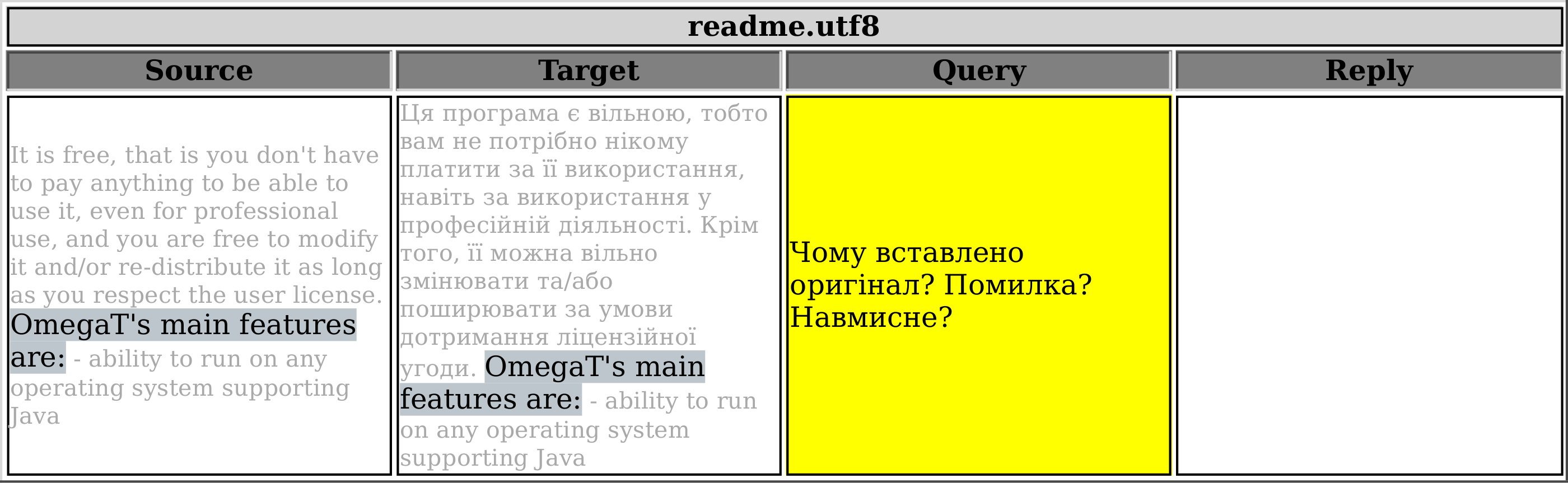
This script is variation of the one published before that exports all notes in the current project. The only difference is that this one allows you to select which notes will get exported based on the first line of the note. The resultant HTML table will consist of four columns: Source, Target, Filtered Notes (adjustable heading name), and Reply.
Say, you want to be able to export only the notes that start with <query>, as you’ve been using this word (<query>) to mark your questions to the client. In order to do so, go to line 14 and specify which mark-word was used. Note: The mark-word used to filter notes should be found in the very beginning of the very first line of the note, otherwise it’ll be ignored. In line 15 you can specify the column heading.
 All project notes |
 Only filtered notes |
Export #OmegaT Project Notes
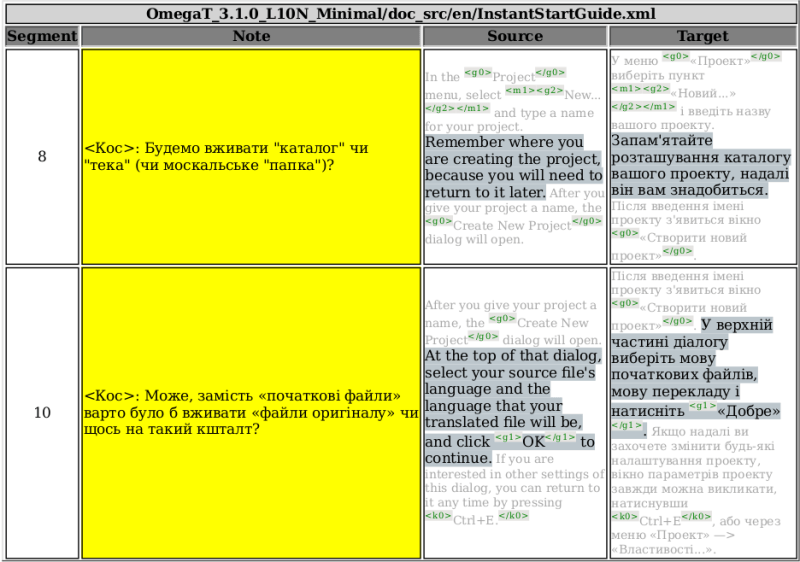
Here’s a new script that lets you export OmegaT project notes to a HTML table. It may help you to discuss different translation issues with the client/editor/your spiritual guru or review your own translation if you use notes for yourself.
When the script is invoked, it will create a file named PROJECTNAME_notes.html in /script_output subfolder of the current project root (the subfolder will be created if it doesn’t exist, and PROJECTNAME is the actual name, of course).
XLIFF to TMX
One of the recent scripts published here allowed OmegaT users who wanted their project to be worked on in a different CAT tool, to export the whole OmegaT project to an XLIFF file. To get the completed work back to OmegaT, one had to run Okapi Rainbow to convert XLIFF to TMX, possibly using the Rainbow settings file created by the script.
In this post I’ll share how to convert those OmegaT-created XLIFF files finished (or partly finished) in Trados/MemoQ/Deja Vu/WhatNotCAT back to TMX that can be used in OmegaT (all tags preserved, of course, that was the whole point), right from within OmegaT, without running Rainbow manually. Continue reading
Export OmegaT Project to HTML table
Here’s a script that lets you export your whole OmegaT project into an HTML file with one or more tables, one for each source file. The left column will have source segments, and the right will be either blank if the segment isn’t translated, or populated with translation (or , if translation was set to be empty). Each table will have source file name for its heading. The script was requested and kindly sponsored by Roman Mironov at Translation Agency Velior. As usual, in the below listing the heading is a link to pastebin.com where you can download this script. Continue reading
Export relavant TU’s from legacy TMX files in OmegaT
Situation
You have a new project and legacy translation memory files that usually go to /tm folder of OmegaT project. You need to give this project to someone else, but you don’t want to give away all of your previous translation. Somehow you need to extract from your TMX files only those TU’s that have matches in the current project.
Problem
The problem is evident — you need OmegaT to get matches for each segment, and if they are any good, store them somewhere handy, in a separate TMX file.
The problem has been (or still is) discussed on OmegaT Yahoo Group.
Solution
lame GUI update to the new TMX export
This is an update to the previous post about exporting new translations to a TMX.
The script doesn’t have a GUI to select date and time or to specify whether it should work globally or on selected files. This update still doesn’t have that GUI, but provides for an external program to fill that gap. In this post I’m sharing the updated groovy script and a simple bash+zenity wizard-like script for Linux that acquires necessary data.
If no such external program/script exists, the groovy script continues to work as before without any extra fuss.
-
write_new_trans2TMX_extGUI.groovy
/*
 * Purpose:	 Export new translations completed after the specified
 * 	 date (line 21) either for the entire project or for the
 * 	 selected files ("select_files" must be set to 'yes' — line 27)
 * 	 to TMX file
 * #Files:	 Writes 'translated_after_<date_time>.tmx'
 * 	 in the current project's root
 * #File format:	 TMX v.1.4
 * #Details:	http:/ /wp.me / p3fHEs-6z
 *
 * @author  Kos Ivantsov
 * @date    2013-08-12
 * @version 0.3
 */

/*
 * The date should be specified as "year-month-day HOURS:minutes"
 * If not specified or specified wrongly, the script will look for
 * translations that are newer than one day.
 */
def newdate = ''
/*
 * Set "select_files" to 'yes' if you want to use file selector
 * to specify files for export. If anything else is specified, the script
 * will work with the complete project.
 */
select_files = ''

import javax.swing.JFileChooser
import org.omegat.util.StaticUtils
import org.omegat.util.TMXReader
import static javax.swing.JOptionPane.*
import static org.omegat.util.Platform.*
def prop = project.projectProperties

if (!prop) {
	final def title = 'Export new translation'
	final def msg   = 'Please try again after you open a project.'
	showMessageDialog null, msg, title, INFORMATION_MESSAGE
	return
}

/*
 * If you want to use an external date and time selector and a window to
 * ask whether you want to select individual files, specify the whole path
 * to that program/script. It should print out date in the proper format
 * on the first line of the stout, and "yes" or anything else on the second
 * line.
 */
def command = "/home/user/.omegat/script/new2tmx_tweak"
try {
	proc = command.execute()
	proc.waitFor()
	//console.println "${proc.in.text}"
	def lines = "${proc.in.text}".readLines()
	newdate = lines[0]
	select_files = lines[1]
	}
catch(java.io.IOException ex){
if (ex.getMessage() =~ 'error=13'){
	console.println "The program is not executable"
	}
if (ex.getMessage() =~ 'error=2'){
	console.println "The program is not found"
	}
}

try {
	newdate = new Date().parse("yyyy-MM-dd HH:mm", newdate)
	}
	catch (java.text.ParseException e) {
		newdate = new Date().minus(1)
		final def title = 'Wrong date format'
		final def msg   = """\
The date has been specified in a wrong format.
The script will work with entries exactly one day old,
i.e. changed after $newdate\
"""
		console.println msg
		showMessageDialog null, msg, title, INFORMATION_MESSAGE
		}

namedate = new Date().parse("E MMM dd H:m:s z yyyy", newdate.toString()).format("MMM-dd-yyyy_HH.mm")

def fileloc = prop.projectRoot+'translated_after_'+namedate+"${ (select_files == 'yes') ? "_select" : ''}"+'.tmx'
exportfile = new File(fileloc)

if (prop.isSentenceSegmentingEnabled())
	segmenting = TMXReader.SEG_SENTENCE
	else
	segmenting = TMXReader.SEG_PARAGRAPH

def sourceLocale = prop.getSourceLanguage().toString()
def targetLocale = prop.getTargetLanguage().toString()

exportfile.write("", 'UTF-8')
exportfile.append("<?xml version=\"1.0\" encoding=\"UTF-8\"?>\n", 'UTF-8')
exportfile.append("<!DOCTYPE tmx SYSTEM \"tmx11.dtd\">\n", 'UTF-8')
exportfile.append("<tmx version=\"1.4\">\n", 'UTF-8')
exportfile.append(" <header\n", 'UTF-8')
exportfile.append("  creationtool=\"OmegaTScripting\"\n", 'UTF-8')
exportfile.append("  segtype=\"" + segmenting + "\"\n", 'UTF-8')
exportfile.append("  o-tmf=\"OmegaT TMX\"\n", 'UTF-8')
exportfile.append("  adminlang=\"EN-US\"\n", 'UTF-8')
exportfile.append("  srclang=\"" + sourceLocale + "\"\n", 'UTF-8')
exportfile.append("  datatype=\"plaintext\"\n", 'UTF-8')
exportfile.append(" >\n", 'UTF-8')

def hitcount = 0

if ((select_files == 'yes')) {
	srcroot = new File(prop.getSourceRoot())
	sourceroot = prop.getSourceRoot().toString() as String
	JFileChooser fc = new JFileChooser(
	currentDirectory: srcroot,
	dialogTitle: "Choose files to export",
	fileSelectionMode: JFileChooser.FILES_ONLY,
	//the file filter must show also directories, in order to be able to look into them
	multiSelectionEnabled: true)

	if(fc.showOpenDialog() != JFileChooser.APPROVE_OPTION) {
	console.println "Canceled"
	return
	}

	if (!(fc.selectedFiles =~ sourceroot.replaceAll(/\\+/, '\\\\\\\\'))) {
		console.println "Selection outside of ${prop.getSourceRoot()} folder"
		final def title = 'Wrong file(s) selected'
		final def msg   = "Files must be in ${prop.getSourceRoot()} folder."
		showMessageDialog null, msg, title, INFORMATION_MESSAGE
		return
	}

	fc.selectedFiles.each {
		fl = "${it.toString()}" - "$sourceroot"
		exportfile.append("  <prop type=\"Filename\">" + fl + "</prop>\n", 'UTF-8')
	}
	exportfile.append(" </header>\n", 'UTF-8')
	exportfile.append("  <body>\n", 'UTF-8')

	fc.selectedFiles.each{
		fl = "${it.toString()}" - "$sourceroot"
		files = project.projectFiles
		files.each{
			if ( "${it.filePath}" != "$fl" ) {
			println "Skipping to the next file"
			}else{
		it.entries.each {
		def info = project.getTranslationInfo(it)
		def changeId = info.changer
		def changeDate = info.changeDate
		def creationId = info.creator
		def creationDate = info.creationDate
		def alt = 'unknown'
		if (info.isTranslated()) {
			if (newdate.before(new Date(changeDate))){
				hitcount++
				source = StaticUtils.makeValidXML(it.srcText)
				target = StaticUtils.makeValidXML(info.translation)
				exportfile.append("    <tu>\n", 'UTF-8')
				exportfile.append("      <tuv xml:lang=\"" + sourceLocale + "\">\n", 'UTF-8')
				exportfile.append("        <seg>" + "$source" + "</seg>\n", 'UTF-8')
				exportfile.append("      </tuv>\n", 'UTF-8')
				exportfile.append("      <tuv xml:lang=\"" + targetLocale + "\"", 'UTF-8')
				exportfile.append(" changeid=\"${changeId ?: alt }\"", 'UTF-8')
				exportfile.append(" changedate=\"${ changeDate > 0 ? new Date(changeDate).format("yyyyMMdd'T'HHmmss'Z'") : alt }\"", 'UTF-8')
				exportfile.append(" creationid=\"${creationId ?: alt }\"", 'UTF-8')
				exportfile.append(" creationdate=\"${ creationDate > 0 ? new Date(creationDate).format("yyyyMMdd'T'HHmmss'Z'") : alt }\"", 'UTF-8')
				exportfile.append(">\n", 'UTF-8')
				exportfile.append("        <seg>" + "$target" + "</seg>\n", 'UTF-8')
				exportfile.append("      </tuv>\n", 'UTF-8')
				exportfile.append("    </tu>\n", 'UTF-8')
						}
					}
				}
			}
		}
	}
} else {
	exportfile.append(" </header>\n", 'UTF-8')
	exportfile.append("  <body>\n", 'UTF-8')
	files = project.projectFiles
		files.each {
			it.entries.each {
			def info = project.getTranslationInfo(it)
			def changeId = info.changer
			def changeDate = info.changeDate
			def creationId = info.creator
			def creationDate = info.creationDate
			def alt = 'unknown'
			if (info.isTranslated()) {
				if (newdate.before(new Date(changeDate))){
				hitcount++
				source = StaticUtils.makeValidXML(it.srcText)
				target = StaticUtils.makeValidXML(info.translation)
				exportfile.append("    <tu>\n", 'UTF-8')
				exportfile.append("      <tuv xml:lang=\"" + sourceLocale + "\">\n", 'UTF-8')
				exportfile.append("        <seg>" + "$source" + "</seg>\n", 'UTF-8')
				exportfile.append("      </tuv>\n", 'UTF-8')
				exportfile.append("      <tuv xml:lang=\"" + targetLocale + "\"", 'UTF-8')
				exportfile.append(" changeid=\"${changeId ?: alt }\"", 'UTF-8')
				exportfile.append(" changedate=\"${ changeDate > 0 ? new Date(changeDate).format("yyyyMMdd'T'HHmmss'Z'") : alt }\"", 'UTF-8')
				exportfile.append(" creationid=\"${creationId ?: alt }\"", 'UTF-8')
				exportfile.append(" creationdate=\"${ creationDate > 0 ? new Date(creationDate).format("yyyyMMdd'T'HHmmss'Z'") : alt }\"", 'UTF-8')
				exportfile.append(">\n", 'UTF-8')
				exportfile.append("        <seg>" + "$target" + "</seg>\n", 'UTF-8')
				exportfile.append("      </tuv>\n", 'UTF-8')
				exportfile.append("    </tu>\n", 'UTF-8')
					}
				}
			}
		}
}

exportfile.append("  </body>\n", 'UTF-8')
exportfile.append("</tmx>", 'UTF-8')

final def title = 'TMX file written'
final def msg   = "$hitcount TU's written to " + exportfile.toString()
console.println msg
showMessageDialog null, msg, title, INFORMATION_MESSAGE
return
The only difference compared to the previous version is lines 43-66. The external program is specified in line 50.
- new2tmx_tweak
#!/bin/bash
DATE=$(zenity --calendar \
--title "Select date" \
--text="TU's newer than the selected date will be used for export" \
--date-format=%F)

HRS=({00..24})
MINS=({00..59})

HRS=$(zenity --entry --title "Select time" \
--text="Hours" \
--entry-text="${HRS[@]}" )

MINS=$(zenity --entry --title "Select time" \
--text="Minutes" \
--entry-text="${MINS[@]}" )

zenity --question --title="Select Files" \
--text="Do you want to select individual files for export?"
if [ $? == "0" ]; then
FILESEL='yes'
else
FILESEL='no'
fi

echo "$DATE $HRS:$MINS"
echo $FILESEL
This script should be saved somewhere (in this example it’s /home/user/.omegat/script/new2tmx_tweak) and made executable (
chmod +x /home/user/.omegat/script/new2tmx_tweak). Zenity should be installed for it to work. One can cook up a nicer GUI using other tools, of course, but this serves just as a quick example. I guess, similar can be done using AutoIt or AutoHotKey on MS Windows or AppleScript on OSX.
If you happen to come up with your own date and time picker for this, feel free to share in comments or link to your solution.
But as of now,
Good luck!
Export TMX for new translations
Here’s a script that lets you export translation units that are newer than a specified date. It might be useful if you get a project with a legacy TMX containing some perfect matches (that memory should be put into /tm/auto), and you want to be able to run QA tests only on new TU’s that have been translated since you’ve started to work on the project, or you want to keep your own translations for later and don’t really care for what has been translated before.
If the script is invoked without changing or specifying anything, it looks for TU’s that are one day old and works globally on the whole project. If you need to filter TU’s older or newer than that, you’ll have to specify the date on line 21.
The date should be in “yyyy-MM-dd HH:mm” (4_digit_year-2_digit_month-2_digit_day space 2_digit_hour_in_military_notation:2_digit_minute) format. If not specified properly, it will fall back to the default one-day-old value.
Beside that, the user can specify whether the script should work globally on the entire project, or only on selected files. To enable file selection, the line 27 should read:
select_files = 'yes'
Anything other than ‘yes’ means the script will work globally. Continue reading
Export TMX for selected files
OmegaT exports TMX for current files in the project every time translated documents are created. It writes three TMX files in the root of the project. But what if you need a translation memory file that contains translation units of only one or several files, not all that are currently present in the project. One solution is to temporarily move unneeded files out of source folder, reload the project and then create translated documents. But it is somewhat awkward and time consuming.
Here’s a groovy script that lets you select one or several files located in the same subfolder of the current project’s /source. Once they are selected, the script writes selected_files.[date_time].tmx in the project root. This TMX-file contains TU’s only for the selected files.
- write_sel_files2TMX.groovy
/*
 * Purpose:	Export source and translation segments of user selected
 *	files into TMX-file
 * #Files:	Writes 'selected_files_<date_time>.tmx' in the current project's root
 * #File format:	TMX v.1.4
 * #Details:	http:/ /wp.me / p3fHEs-6g
 *
 * @author  Kos Ivantsov
 * @date    2013-08-12
 * @version 0.3
 */

import javax.swing.JFileChooser
import org.omegat.util.StaticUtils
import org.omegat.util.TMXReader
import static javax.swing.JOptionPane.*
import static org.omegat.util.Platform.*

def prop = project.projectProperties
if (!prop) {
	final def title = 'Export TMX from selected files'
	final def msg   = 'Please try again after you open a project.'
	showMessageDialog null, msg, title, INFORMATION_MESSAGE
	return
}

def curtime = new Date().format("MMM-dd-yyyy_HH.mm")
srcroot = new File(prop.getSourceRoot())
def fileloc = prop.projectRoot+'selected_files_'+curtime+'.tmx'
exportfile = new File(fileloc)
def sourceroot = prop.getSourceRoot().toString() as String

JFileChooser fc = new JFileChooser(
	currentDirectory: srcroot,
	dialogTitle: "Choose files to export",
	fileSelectionMode: JFileChooser.FILES_ONLY,
	//the file filter must show also directories, in order to be able to look into them
	multiSelectionEnabled: true)

if(fc.showOpenDialog() != JFileChooser.APPROVE_OPTION) {
console.println "Canceled"
return
}

if (!(fc.selectedFiles =~ sourceroot.replaceAll(/\\+/, '\\\\\\\\'))) {
		console.println "Selection outside of ${prop.getSourceRoot()} folder"
		final def title = 'Wrong file(s) selected'
		final def msg   = "Files must be in ${prop.getSourceRoot()} folder."
		showMessageDialog null, msg, title, INFORMATION_MESSAGE
		return
	}

if (prop.isSentenceSegmentingEnabled())
	segmenting = TMXReader.SEG_SENTENCE
	else
	segmenting = TMXReader.SEG_PARAGRAPH

def sourceLocale = prop.getSourceLanguage().toString()
def targetLocale = prop.getTargetLanguage().toString()

exportfile.write("", 'UTF-8')
exportfile.append("<?xml version=\"1.0\" encoding=\"UTF-8\"?>\n", 'UTF-8')
exportfile.append("<!DOCTYPE tmx SYSTEM \"tmx11.dtd\">\n", 'UTF-8')
exportfile.append("<tmx version=\"1.4\">\n", 'UTF-8')
exportfile.append(" <header\n", 'UTF-8')
exportfile.append("  creationtool=\"OmegaTScripting\"\n", 'UTF-8')
exportfile.append("  segtype=\"" + segmenting + "\"\n", 'UTF-8')
exportfile.append("  o-tmf=\"OmegaT TMX\"\n", 'UTF-8')
exportfile.append("  adminlang=\"EN-US\"\n", 'UTF-8')
exportfile.append("  srclang=\"" + sourceLocale + "\"\n", 'UTF-8')
exportfile.append("  datatype=\"plaintext\"\n", 'UTF-8')
exportfile.append(" >\n", 'UTF-8')
fc.selectedFiles.each{
	fl = "${it.toString()}" - "$sourceroot"
	exportfile.append("  <prop type=\"Filename\">" + fl + "</prop>\n", 'UTF-8')
}
exportfile.append(" </header>\n", 'UTF-8')
exportfile.append("  <body>\n", 'UTF-8')

def count = 0
fc.selectedFiles.each{
	fl = "${it.toString()}" - "$sourceroot"
	files = project.projectFiles
	files.each{
		if ( "${it.filePath}" != "$fl" ) {
		println "Skipping to the next file"
		}else{
	it.entries.each {
	def info = project.getTranslationInfo(it)
	def changeId = info.changer
	def changeDate = info.changeDate
	def creationId = info.creator
	def creationDate = info.creationDate
	def alt = 'unknown'
	if (info.isTranslated()) {
		source = StaticUtils.makeValidXML(it.srcText)
		target = StaticUtils.makeValidXML(info.translation)
		exportfile.append("    <tu>\n", 'UTF-8')
		exportfile.append("      <tuv xml:lang=\"" + sourceLocale + "\">\n", 'UTF-8')
		exportfile.append("        <seg>" + "$source" + "</seg>\n", 'UTF-8')
		exportfile.append("      </tuv>\n", 'UTF-8')
		exportfile.append("      <tuv xml:lang=\"" + targetLocale + "\"", 'UTF-8')
		exportfile.append(" changeid=\"${changeId ?: alt }\"", 'UTF-8')
		exportfile.append(" changedate=\"${ changeDate > 0 ? new Date(changeDate).format("yyyyMMdd'T'HHmmss'Z'") : alt }\"", 'UTF-8')
		exportfile.append(" creationid=\"${creationId ?: alt }\"", 'UTF-8')
		exportfile.append(" creationdate=\"${ creationDate > 0 ? new Date(creationDate).format("yyyyMMdd'T'HHmmss'Z'") : alt }\"", 'UTF-8')
		exportfile.append(">\n", 'UTF-8')
		exportfile.append("        <seg>" + "$target" + "</seg>\n", 'UTF-8')
		exportfile.append("      </tuv>\n", 'UTF-8')
		exportfile.append("    </tu>\n", 'UTF-8')
		count++;
				}
			}
		}
	}
}
exportfile.append("  </body>\n", 'UTF-8')
exportfile.append("</tmx>", 'UTF-8')

final def title = 'TMX file written'
final def msg   = "$count TU's written to " + exportfile.toString()
console.println msg
showMessageDialog null, msg, title, INFORMATION_MESSAGE
return
The TMX file is rewritten each time the script in invoked.
Big thank you goes to Roman Mironov and Velior Translation Agency for the idea and comprehensive support.
Suggestions and comments are always welcome.
But as of now,
Good luck!
 True Translation