I meant to write a short article about OmegaT script basics for a long time, but never found time to do so. This mishap got fixed without me, and out of gratitude I’m posting my translation of Gli script di OmegaT by LanguageLane. Continue reading
Tag Archives: OmegaT script
“Filtered” Note Export in #OmegaT
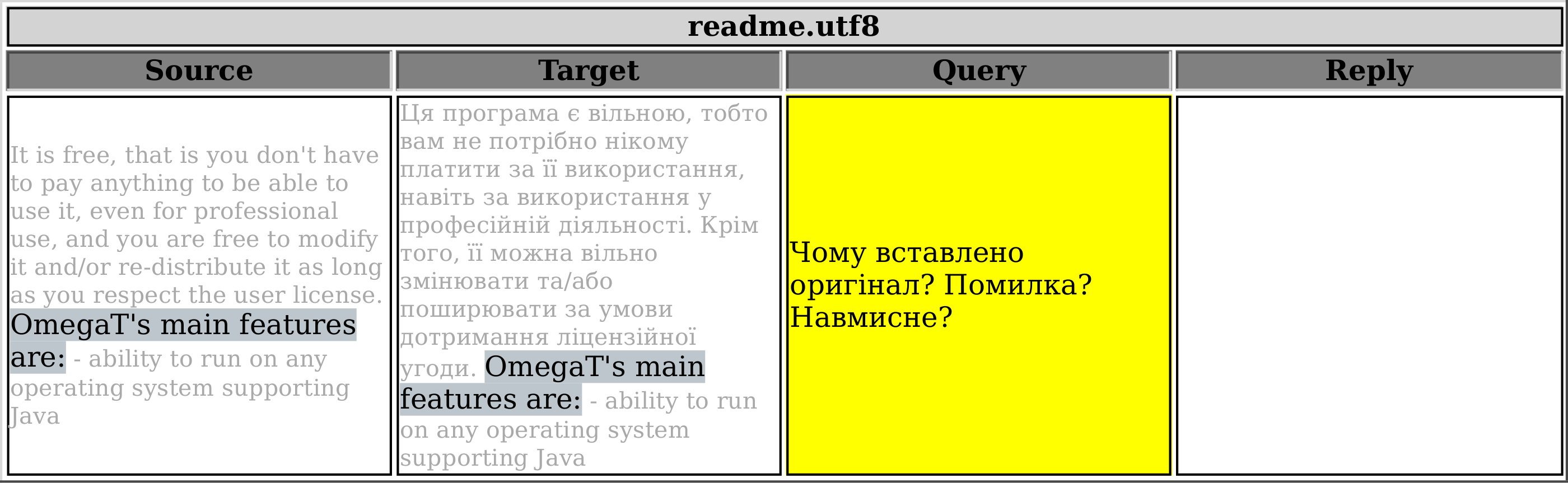
This script is variation of the one published before that exports all notes in the current project. The only difference is that this one allows you to select which notes will get exported based on the first line of the note. The resultant HTML table will consist of four columns: Source, Target, Filtered Notes (adjustable heading name), and Reply.
Say, you want to be able to export only the notes that start with <query>, as you’ve been using this word (<query>) to mark your questions to the client. In order to do so, go to line 14 and specify which mark-word was used. Note: The mark-word used to filter notes should be found in the very beginning of the very first line of the note, otherwise it’ll be ignored. In line 15 you can specify the column heading.
 All project notes |
 Only filtered notes |
Export #OmegaT Project Notes
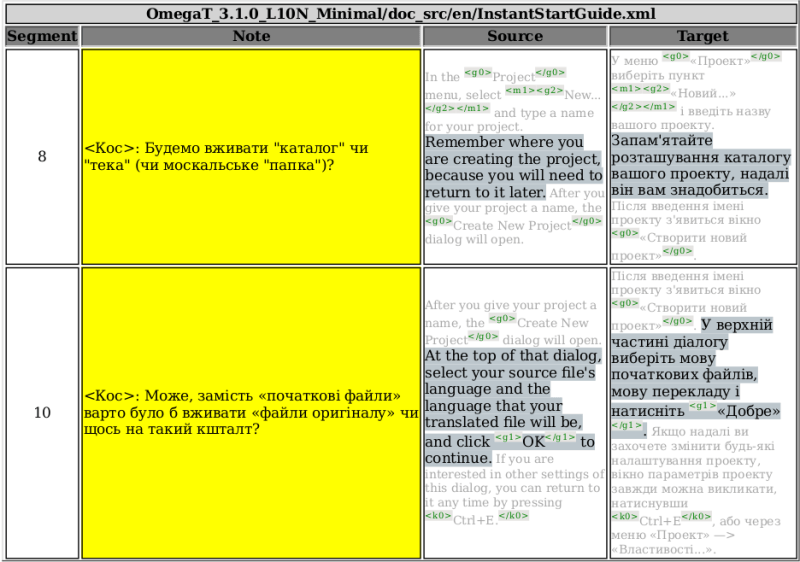
Here’s a new script that lets you export OmegaT project notes to a HTML table. It may help you to discuss different translation issues with the client/editor/your spiritual guru or review your own translation if you use notes for yourself.
When the script is invoked, it will create a file named PROJECTNAME_notes.html in /script_output subfolder of the current project root (the subfolder will be created if it doesn’t exist, and PROJECTNAME is the actual name, of course).
XLIFF to TMX
One of the recent scripts published here allowed OmegaT users who wanted their project to be worked on in a different CAT tool, to export the whole OmegaT project to an XLIFF file. To get the completed work back to OmegaT, one had to run Okapi Rainbow to convert XLIFF to TMX, possibly using the Rainbow settings file created by the script.
In this post I’ll share how to convert those OmegaT-created XLIFF files finished (or partly finished) in Trados/MemoQ/Deja Vu/WhatNotCAT back to TMX that can be used in OmegaT (all tags preserved, of course, that was the whole point), right from within OmegaT, without running Rainbow manually. Continue reading
Locked OmegaT Team Project (SVN)
Situation
One of the translators involved in a team translation project using a very cool OmegaT Team project feature gets a message about the project being locked.

Problem
The translator’s connectivity is rather limited and re-downloading the whole project would be very undesirable. There’s also no SVN software installed on her computer (other than OmegaT itself). Otherwise the quickest solution would be either getting OmegaT to download the project anew into an empty folder, or run “svn cleanup” on the project’s folder using one of the available SVN tools. Bad luck this time.
Solution
Since OmegaT can act as a SVN client itself (that’s what it does when a Team project is loaded), and there’s a cool scripting functionality, why not just exploit OmegaT to do the cleanup on any folder of our choice? So, here’s the script (the heading is also a link):
- svn_cleanup_selected.groovy
/* * Perform SVN cleanup on any local SVN repository * * @author Yu Tang * @author Kos Ivatsov * @date 2014-01-17 * @version 0.2 */ import javax.swing.JFileChooser import org.omegat.core.team.SVNRemoteRepository import org.tmatesoft.svn.core.wc.* def folder if (project.isProjectLoaded()) { def prop = project.getProjectProperties() folder = new File(prop.getProjectRoot()) }else{ JFileChooser fc = new JFileChooser( dialogTitle: &amp;quot;Choose SVN repository to perform cleanup&amp;quot;, fileSelectionMode: JFileChooser.DIRECTORIES_ONLY, multiSelectionEnabled: false ) if(fc.showOpenDialog() != JFileChooser.APPROVE_OPTION) { console.println &amp;quot;Canceled&amp;quot; return } folder = new File(fc.getSelectedFile().toString()) } if (SVNRemoteRepository.isSVNDirectory(folder)) { def clientManager = SVNClientManager.newInstance() clientManager.getWCClient().doCleanup(folder) console.println(&amp;quot;Cleanup done!!&amp;quot;) } returnIf that pesky message pops up, it should usually suffice to fire up the script (it works even if no project is currently loaded, otherwise it cleans up the current project if it happens to be a Team project), browse to the problematic project folder and get “Cleanup done!!” message in the Scripting console. After that, the project should open without problems.
After the fix there might be a problem with sync, and OmegaT may throw a message like this:

but that is usually easily fixed with Ctrl+S (Save) or F5 (Reload).
I wish you all good and stable Internet connection, responsive and responsible team members and a glitch-less work-flow.
But as of now,
Good luck
UPDATE:
The script is now bundled with OmegaT, you’ll get it along with the program. No need to download it from the links posted here.
Convert OmegaT project to XLIFF for other CAT tools
I’m back with another little script that might be pretty handy for those who need to work on the same material in different CAT tools, or for translation agencies who use OmegaT as their main CAT application but farm out the work to translators using their CAT tools of choice. As a matter of fact, the script was requested by translation agency Velior for this very reason.
When the script is invoked, it writes out a file named PROJECTNAME.xlf (PROJECTNAME is the actual name of the project, not this loudly yelled word, of course), and the file is located in script_output subfolder of the current project. It exports both translated (they get “final” state in the resultant XLF file) and untranslated segments, and for untranslated segments the source is copied to the target, and such segments get “needs-translation” state. OmegaT segmentation and tags are preserved. Tags get enveloped in <ph id=”x”> and </ph>, so that they are treated as tags in other CAT tools. Continue reading
Insert Custom Tag-like Strings in OmegaT
This is a little article on how to semi-automatically insert context-dependent custom strings in OmegaT. To illustrate what I mean, I give a little example from the kind of work I get to do pretty often. Continue reading
Export OmegaT Project to HTML table
Here’s a script that lets you export your whole OmegaT project into an HTML file with one or more tables, one for each source file. The left column will have source segments, and the right will be either blank if the segment isn’t translated, or populated with translation (or , if translation was set to be empty). Each table will have source file name for its heading. The script was requested and kindly sponsored by Roman Mironov at Translation Agency Velior. As usual, in the below listing the heading is a link to pastebin.com where you can download this script. Continue reading
Export relavant TU’s from legacy TMX files in OmegaT
Situation
You have a new project and legacy translation memory files that usually go to /tm folder of OmegaT project. You need to give this project to someone else, but you don’t want to give away all of your previous translation. Somehow you need to extract from your TMX files only those TU’s that have matches in the current project.
Problem
The problem is evident — you need OmegaT to get matches for each segment, and if they are any good, store them somewhere handy, in a separate TMX file.
The problem has been (or still is) discussed on OmegaT Yahoo Group.
Solution
lame GUI update to the new TMX export
This is an update to the previous post about exporting new translations to a TMX.
The script doesn’t have a GUI to select date and time or to specify whether it should work globally or on selected files. This update still doesn’t have that GUI, but provides for an external program to fill that gap. In this post I’m sharing the updated groovy script and a simple bash+zenity wizard-like script for Linux that acquires necessary data.
If no such external program/script exists, the groovy script continues to work as before without any extra fuss.
-
write_new_trans2TMX_extGUI.groovy
/*
 * Purpose:	 Export new translations completed after the specified
 * 	 date (line 21) either for the entire project or for the
 * 	 selected files ("select_files" must be set to 'yes' — line 27)
 * 	 to TMX file
 * #Files:	 Writes 'translated_after_<date_time>.tmx'
 * 	 in the current project's root
 * #File format:	 TMX v.1.4
 * #Details:	http:/ /wp.me / p3fHEs-6z
 *
 * @author  Kos Ivantsov
 * @date    2013-08-12
 * @version 0.3
 */

/*
 * The date should be specified as "year-month-day HOURS:minutes"
 * If not specified or specified wrongly, the script will look for
 * translations that are newer than one day.
 */
def newdate = ''
/*
 * Set "select_files" to 'yes' if you want to use file selector
 * to specify files for export. If anything else is specified, the script
 * will work with the complete project.
 */
select_files = ''

import javax.swing.JFileChooser
import org.omegat.util.StaticUtils
import org.omegat.util.TMXReader
import static javax.swing.JOptionPane.*
import static org.omegat.util.Platform.*
def prop = project.projectProperties

if (!prop) {
	final def title = 'Export new translation'
	final def msg   = 'Please try again after you open a project.'
	showMessageDialog null, msg, title, INFORMATION_MESSAGE
	return
}

/*
 * If you want to use an external date and time selector and a window to
 * ask whether you want to select individual files, specify the whole path
 * to that program/script. It should print out date in the proper format
 * on the first line of the stout, and "yes" or anything else on the second
 * line.
 */
def command = "/home/user/.omegat/script/new2tmx_tweak"
try {
	proc = command.execute()
	proc.waitFor()
	//console.println "${proc.in.text}"
	def lines = "${proc.in.text}".readLines()
	newdate = lines[0]
	select_files = lines[1]
	}
catch(java.io.IOException ex){
if (ex.getMessage() =~ 'error=13'){
	console.println "The program is not executable"
	}
if (ex.getMessage() =~ 'error=2'){
	console.println "The program is not found"
	}
}

try {
	newdate = new Date().parse("yyyy-MM-dd HH:mm", newdate)
	}
	catch (java.text.ParseException e) {
		newdate = new Date().minus(1)
		final def title = 'Wrong date format'
		final def msg   = """\
The date has been specified in a wrong format.
The script will work with entries exactly one day old,
i.e. changed after $newdate\
"""
		console.println msg
		showMessageDialog null, msg, title, INFORMATION_MESSAGE
		}

namedate = new Date().parse("E MMM dd H:m:s z yyyy", newdate.toString()).format("MMM-dd-yyyy_HH.mm")

def fileloc = prop.projectRoot+'translated_after_'+namedate+"${ (select_files == 'yes') ? "_select" : ''}"+'.tmx'
exportfile = new File(fileloc)

if (prop.isSentenceSegmentingEnabled())
	segmenting = TMXReader.SEG_SENTENCE
	else
	segmenting = TMXReader.SEG_PARAGRAPH

def sourceLocale = prop.getSourceLanguage().toString()
def targetLocale = prop.getTargetLanguage().toString()

exportfile.write("", 'UTF-8')
exportfile.append("<?xml version=\"1.0\" encoding=\"UTF-8\"?>\n", 'UTF-8')
exportfile.append("<!DOCTYPE tmx SYSTEM \"tmx11.dtd\">\n", 'UTF-8')
exportfile.append("<tmx version=\"1.4\">\n", 'UTF-8')
exportfile.append(" <header\n", 'UTF-8')
exportfile.append("  creationtool=\"OmegaTScripting\"\n", 'UTF-8')
exportfile.append("  segtype=\"" + segmenting + "\"\n", 'UTF-8')
exportfile.append("  o-tmf=\"OmegaT TMX\"\n", 'UTF-8')
exportfile.append("  adminlang=\"EN-US\"\n", 'UTF-8')
exportfile.append("  srclang=\"" + sourceLocale + "\"\n", 'UTF-8')
exportfile.append("  datatype=\"plaintext\"\n", 'UTF-8')
exportfile.append(" >\n", 'UTF-8')

def hitcount = 0

if ((select_files == 'yes')) {
	srcroot = new File(prop.getSourceRoot())
	sourceroot = prop.getSourceRoot().toString() as String
	JFileChooser fc = new JFileChooser(
	currentDirectory: srcroot,
	dialogTitle: "Choose files to export",
	fileSelectionMode: JFileChooser.FILES_ONLY,
	//the file filter must show also directories, in order to be able to look into them
	multiSelectionEnabled: true)

	if(fc.showOpenDialog() != JFileChooser.APPROVE_OPTION) {
	console.println "Canceled"
	return
	}

	if (!(fc.selectedFiles =~ sourceroot.replaceAll(/\\+/, '\\\\\\\\'))) {
		console.println "Selection outside of ${prop.getSourceRoot()} folder"
		final def title = 'Wrong file(s) selected'
		final def msg   = "Files must be in ${prop.getSourceRoot()} folder."
		showMessageDialog null, msg, title, INFORMATION_MESSAGE
		return
	}

	fc.selectedFiles.each {
		fl = "${it.toString()}" - "$sourceroot"
		exportfile.append("  <prop type=\"Filename\">" + fl + "</prop>\n", 'UTF-8')
	}
	exportfile.append(" </header>\n", 'UTF-8')
	exportfile.append("  <body>\n", 'UTF-8')

	fc.selectedFiles.each{
		fl = "${it.toString()}" - "$sourceroot"
		files = project.projectFiles
		files.each{
			if ( "${it.filePath}" != "$fl" ) {
			println "Skipping to the next file"
			}else{
		it.entries.each {
		def info = project.getTranslationInfo(it)
		def changeId = info.changer
		def changeDate = info.changeDate
		def creationId = info.creator
		def creationDate = info.creationDate
		def alt = 'unknown'
		if (info.isTranslated()) {
			if (newdate.before(new Date(changeDate))){
				hitcount++
				source = StaticUtils.makeValidXML(it.srcText)
				target = StaticUtils.makeValidXML(info.translation)
				exportfile.append("    <tu>\n", 'UTF-8')
				exportfile.append("      <tuv xml:lang=\"" + sourceLocale + "\">\n", 'UTF-8')
				exportfile.append("        <seg>" + "$source" + "</seg>\n", 'UTF-8')
				exportfile.append("      </tuv>\n", 'UTF-8')
				exportfile.append("      <tuv xml:lang=\"" + targetLocale + "\"", 'UTF-8')
				exportfile.append(" changeid=\"${changeId ?: alt }\"", 'UTF-8')
				exportfile.append(" changedate=\"${ changeDate > 0 ? new Date(changeDate).format("yyyyMMdd'T'HHmmss'Z'") : alt }\"", 'UTF-8')
				exportfile.append(" creationid=\"${creationId ?: alt }\"", 'UTF-8')
				exportfile.append(" creationdate=\"${ creationDate > 0 ? new Date(creationDate).format("yyyyMMdd'T'HHmmss'Z'") : alt }\"", 'UTF-8')
				exportfile.append(">\n", 'UTF-8')
				exportfile.append("        <seg>" + "$target" + "</seg>\n", 'UTF-8')
				exportfile.append("      </tuv>\n", 'UTF-8')
				exportfile.append("    </tu>\n", 'UTF-8')
						}
					}
				}
			}
		}
	}
} else {
	exportfile.append(" </header>\n", 'UTF-8')
	exportfile.append("  <body>\n", 'UTF-8')
	files = project.projectFiles
		files.each {
			it.entries.each {
			def info = project.getTranslationInfo(it)
			def changeId = info.changer
			def changeDate = info.changeDate
			def creationId = info.creator
			def creationDate = info.creationDate
			def alt = 'unknown'
			if (info.isTranslated()) {
				if (newdate.before(new Date(changeDate))){
				hitcount++
				source = StaticUtils.makeValidXML(it.srcText)
				target = StaticUtils.makeValidXML(info.translation)
				exportfile.append("    <tu>\n", 'UTF-8')
				exportfile.append("      <tuv xml:lang=\"" + sourceLocale + "\">\n", 'UTF-8')
				exportfile.append("        <seg>" + "$source" + "</seg>\n", 'UTF-8')
				exportfile.append("      </tuv>\n", 'UTF-8')
				exportfile.append("      <tuv xml:lang=\"" + targetLocale + "\"", 'UTF-8')
				exportfile.append(" changeid=\"${changeId ?: alt }\"", 'UTF-8')
				exportfile.append(" changedate=\"${ changeDate > 0 ? new Date(changeDate).format("yyyyMMdd'T'HHmmss'Z'") : alt }\"", 'UTF-8')
				exportfile.append(" creationid=\"${creationId ?: alt }\"", 'UTF-8')
				exportfile.append(" creationdate=\"${ creationDate > 0 ? new Date(creationDate).format("yyyyMMdd'T'HHmmss'Z'") : alt }\"", 'UTF-8')
				exportfile.append(">\n", 'UTF-8')
				exportfile.append("        <seg>" + "$target" + "</seg>\n", 'UTF-8')
				exportfile.append("      </tuv>\n", 'UTF-8')
				exportfile.append("    </tu>\n", 'UTF-8')
					}
				}
			}
		}
}

exportfile.append("  </body>\n", 'UTF-8')
exportfile.append("</tmx>", 'UTF-8')

final def title = 'TMX file written'
final def msg   = "$hitcount TU's written to " + exportfile.toString()
console.println msg
showMessageDialog null, msg, title, INFORMATION_MESSAGE
return
The only difference compared to the previous version is lines 43-66. The external program is specified in line 50.
- new2tmx_tweak
#!/bin/bash
DATE=$(zenity --calendar \
--title "Select date" \
--text="TU's newer than the selected date will be used for export" \
--date-format=%F)

HRS=({00..24})
MINS=({00..59})

HRS=$(zenity --entry --title "Select time" \
--text="Hours" \
--entry-text="${HRS[@]}" )

MINS=$(zenity --entry --title "Select time" \
--text="Minutes" \
--entry-text="${MINS[@]}" )

zenity --question --title="Select Files" \
--text="Do you want to select individual files for export?"
if [ $? == "0" ]; then
FILESEL='yes'
else
FILESEL='no'
fi

echo "$DATE $HRS:$MINS"
echo $FILESEL
This script should be saved somewhere (in this example it’s /home/user/.omegat/script/new2tmx_tweak) and made executable (
chmod +x /home/user/.omegat/script/new2tmx_tweak). Zenity should be installed for it to work. One can cook up a nicer GUI using other tools, of course, but this serves just as a quick example. I guess, similar can be done using AutoIt or AutoHotKey on MS Windows or AppleScript on OSX.
If you happen to come up with your own date and time picker for this, feel free to share in comments or link to your solution.
But as of now,
Good luck!
 True Translation