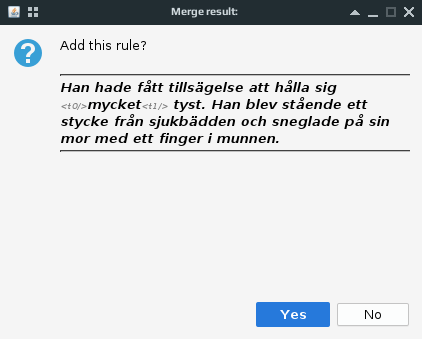
The OmegaT script for merging and splitting segments has received a few improvements:
- It can display the text to be split or merged with or without tags.
- If tags are to be shown, they can be formatted with a different font color and size to make the actual text more readable.
- If a split is attempted while the text cursor is inside a tag, the script won’t add a rule and will inform the user.
- The preview of the split or merge to be performed now has horizontal borders to make it easier to see the possible result.
So, these are the options that can be configured by the user:
enforceProjectSRX   = true   //if true, the script will make sure project-specific segmentation is enabled
separateMappingRule = true   //if true, the script will add a separate group for its rules
showTags            = true   //if false, tags won't be shown in the confirmation message
paintTags           = true   //if true, tags will be shown in different font size and color
tagColor            = "gray" //tag color
tagSize             = 1      //tag size
Comments in these lines should make it pretty clear what each option does. To change an option, go to Tools → Scripting…, then select Merge or split segments in the list of scripts. In the text area on the right side of the screen, scroll down a bit (to about line 30), find the option you want to change, edit it, press Ctrl+S to save, and run the script.
The script is available on GitHub and FS.net.
If you need more info on how to install and use OmegaT scripts, see this quick guide.
If you find this script useful, please leave a comment.

There’s also a very easy way to say thank you.
Your support makes more scripts like this possible.
Happy merging and splitting!
 True Translation